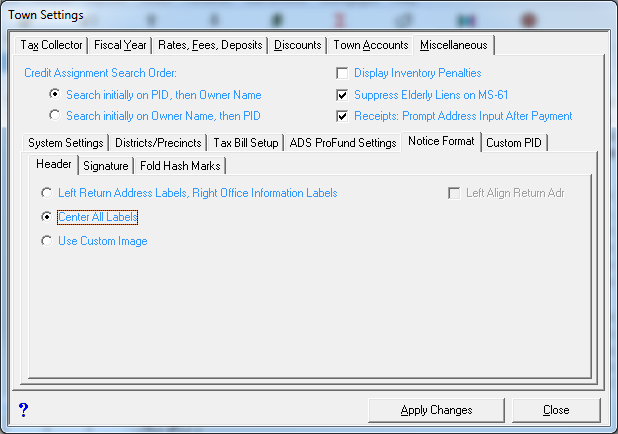
Header Options
You may select any one of three various configurations for the header portion of notices. Left Return Address Labels, Right Office Information Labels, Center All Labels, and Use Custom Image. To change the settings choose Utilities | Town Settings | Miscellaneous | Notice Format | Header. You have the following three options:
- Left Return Address Labels, Right Office Information Labels -- You can choose this option so that your return address information will appear in the upper left corner of each notice, suitable for use with a #10 double window envelope. By default, the alignment of the municipal return address text is set to center align, and sometimes the horizontal alignment of the return address may not line up properly with some double window envelopes. If this is the case for you, check the box "Left Align Return Adr." to the right of the radio button option. If you check this option, the municipal return address will still appear in the upper left portion of the notice, but both the return address and the owner's address will be left aligned. The office information (i.e. location, phone number, hours) will appear in the upper right corner of the notice.
- Center All Labels -- You can choose this option to center all information (i.e. office information and address) in the notice header.
- Use Custom Image -- You can choose this option if you wish to add a custom image or letterhead to the header of each notice. You should use a JPG image that is approximately four times as wide as it is high (e.g. 2500 X 10000 pixels) to avoid it being stretched. For more information on using a Custom Image contact Avitar.